 Slowed and Reverb
Audio effects for desktop Chrome
Slow the song.
Keep the feeling.
Give a familiar track a little more room. Slowed and Reverb lets you change the tempo, keep the singer in key, and hear the effect as the song plays.
01 / Listening room
One verse,
two ways.
Start the sample and switch takes mid-phrase. Listen for the space after each line.
Listening sample • Stereo
A Foolish Game
Madam Snowflake feat. Admiral Bob
Original · 1.00× speed · dry vocal
“A Foolish Game” · Madam Snowflake feat. Admiral Bob · CC BY 3.0. Trimmed and faded. Take B uses the extension’s Slowed preset.Works with the sites you already use.
Play a song on one of these sites in desktop Chrome, open Slowed and Reverb on that tab, then choose a preset.
02 / Inside the extension
Find your own mix.
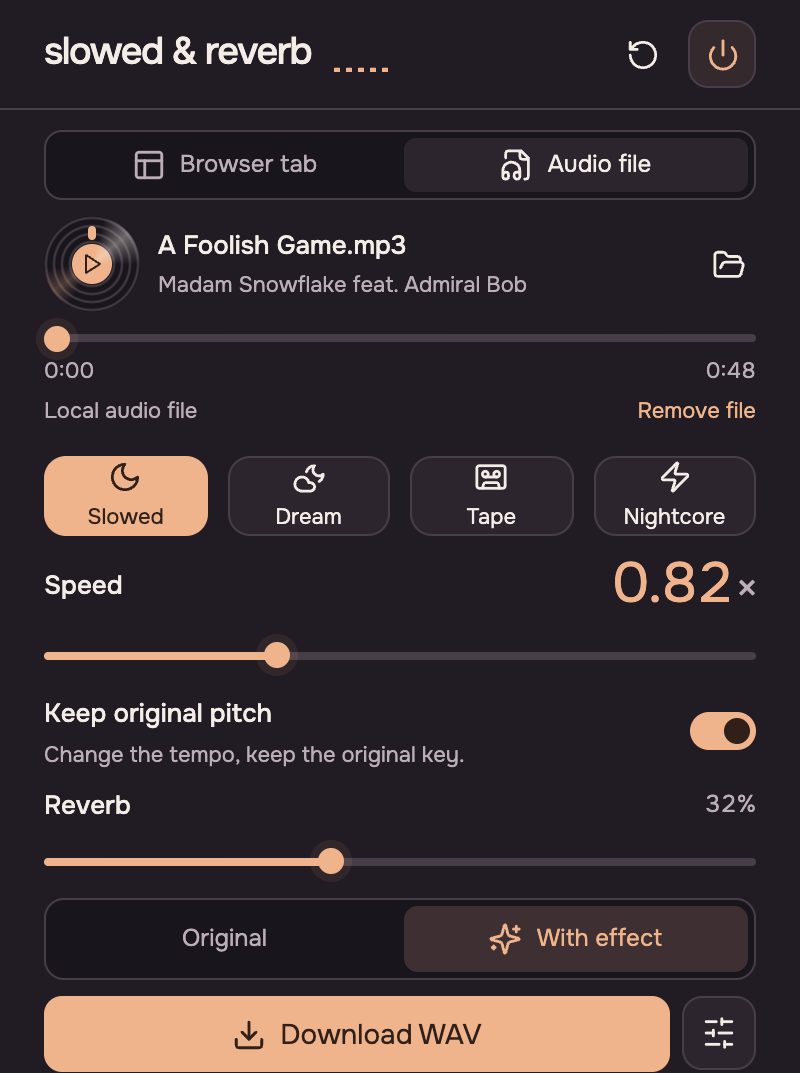
- Start with a preset
- Choose Slowed, Dream, Tape or Nightcore. Try Original at any point to hear what changed.
- Set the tempo and room
- Move from half speed to 1.5×. Keep the original pitch, or turn it off to let the voice drop with the beat. Add reverb to taste.
- Take a mix with you
- Open a file from your device and download the result as a stereo WAV. Both the recording and the mix stay on your computer.
03 / Liner notes
Before you press play.
Which browsers and players are supported?
Use desktop Chrome 116 or later. See the tested players above. Some protected or embedded players may not let Chrome change their sound.
Can I export the song from a browser tab?
Browser tab mode is for live listening. To export, choose Audio file, open a recording you own or have permission to use, then select Download WAV.
What files can I mix?
Try an MP3 or WAV, or another audio format Chrome can decode. Local files can be mono or stereo, up to 50 MiB and ten minutes long.
Do I need an account?
No. The extension processes sound on your device, with no account or audio upload. Read the privacy policy.